Showing posts with label OpenMeetings. Show all posts

Monday, September 13, 2021

OpenMeetings NodeJS Integration and OpenAPI Swagger Spec

 Add OpenMeetings and OM-hosting Elastic Private Cloud or Dedicated Servers to your Node.js powered website via the integration API.

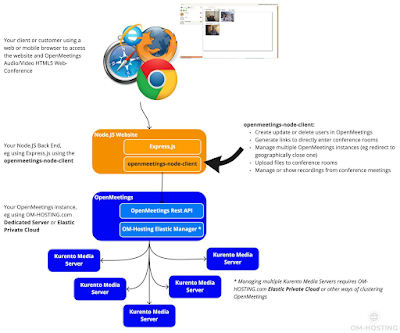
Below example is done via the openmeetings-node-client, a free Node.js Module that OM-Hosting.com publishes and updates. The plugin is based on the OpenMeetings Rest API.

Example use case

OpenMeetings NodeJS Integation

How does it work

With the openmeetings-node-client you can wire up your Node.js based website with any OpenMeetings instance. 

In order to use Clustering and scaling for OpenMeetings you can use OM-hosting.com Elastic Private Cloud or you can use other ways of Clustering OpenMeetings.

Find more information at https://om-hosting.com/openmeetings-integration-nodejs/

Monday, August 16, 2021

OpenMeetings v6.1.0 improves webRTC and stability - Available on om-hosting.com

v6.1.0 is a maintenance release and provides fixes to webRTC components for conference rooms. As well as fixes for UI and browser compatibility. OpenMeetings recently migrated all audio/video components to use HTML5 only (since v5.0.0), it is recommended to keep up to date with latest versions to keep up to date with improvements that browsers support for streaming video.

Stability

  • Room is more stable
  • Screen sharing on Safari is fixed
  • Recording in interview room is fixed

UI

  • OM theme can selected in Admin -> Configuration
  • Configurable Extra menu is added to the rooms
  • Date/time picker is better localized 
Both the Dedicated Server and the Elastic Private Cloud on om-hosting.com have been updated and by default now use v6.1.0, see om-hosting.com

Monday, April 19, 2021

Scale OpenMeetings to 800, 1600 or more concurrent users with Elastic Private Cloud

OM-hosting.com published their new clustering Elastic Private Cloud for OpenMeetings with two initial packages for:

  • Medium Elastic Private Cloud - up to 800 concurrent users
  • Large Elastic Private Cloud - up to 1600 concurrent users
It enhances OpenMeetings so it can dynamically register and scale Media Servers and separating services into different container instances: 

The Elastic Private Cloud enables:
  • Ability to scale up and down with additional hardware to handle performance for Media Server connections across a single OpenMeetings instance
  • All applications are in a separated virtual network
  • Hardware can be swapped without any impact to your data
  • Your data is secured in redundant storages, if the hardware or software fails, your data is still secure. This is for files like recordings and uploaded files as well as transactional (database) data like users and rooms
  • Benefit from Platform Services like SSL, DNS and Secure Email Services

For more information and product offerings see: https://om-hosting.com/elastic-private-cloud-data-sheet/ 

Friday, August 28, 2020

OpenMeetings 5.0.0 release - HTML5 and audio/video using webRTC

OpenMeetings v5.0.0 is the first main release of a HTML5 version of the Web-Conferencing software. All features are using native browser components. There are no plugins required and you can share your webcam and microphone as well as your screen just using HTML5 and JavaScript!

Main new features in 5.0.0

  • Mic/Webcam sharing and viewing in HTML5 
  • Screen sharing and conference room recording in HTML5 
  • Playback of videos and recordings HTML5 
  • Whiteboard in HTML5 
  • Support for mobile and tablet clients using HTML5 enabled browsers 
The migration to HTML5 took 2-3 years and was done in several iterations of partially replacing elements with HTML5. There have been 4 beta releases of v5.0.0 and 200++ Jira tickets as part of version 5, probably 1000++ in the overall migration.

Screenshot from the main conference room:

OpenMeetings HTML5 Conference Room 

Using latest release Apache Wicket 9.0.0 

OpenMeetings uses the latest release of Apache Wicket 9.0.0, especially it uses features around: 

  • Real-Time messaging using WebSockets CSP Policy 
  • Mic/Webcam and Screen access require more strict and reworked browser Content Security Policy (CSP) set via Wicket components 
  • Wicket components for styling and forms for Admin functionality (User and Room management) 
Security in Web-Conferencing and HTML5 

In order to enable mic/webcam and screen access in HTML5 OpenMeetings needs to follow a strict browser security model as required by browsers and webRTC standards (see https://webrtc-security.github.io/). This includes implementing HTTPS for all connections and also some browser specific features. Overview about security and session initialisation at: OpenMeetings+HTML5+Session+Initialisation+and+Security 

Downloads for v5.0.0 are available their project website: https://openmeetings.apache.org/

Commercial support is for hosting or custom development is available from https://openmeetings.apache.org/commercial-support.html